How I Reduced My Email Workload by 90%
I used to spend way too much time on email. Drafting replies from scratch, copy-pasting information from one place to another, and marking things unread so I wouldn't forget them.
Sound familiar?
Here's the thing: most people just accept their inbox as-is and never stop to ask whether it has to feel this way. Email hasn't fundamentally changed since it became embedded in our daily lives in the nineties. It's still just a messaging platform; a system for sending and receiving communication. That's it.
But somewhere along the way, as email volume grew and work became increasingly online, the inbox became a to-do list. An email comes in, gets a quick scan to make sure it isn't urgent, and then gets marked unread as a little flag to come back to later. Hours pass, sometimes days, and the flag gets buried. The mental note fades. And in the background, there's this anxiety of wondering: did I actually follow up on that?
That's not a system. That's just hoping you and your inbox remember things.
But here's the good news: it doesn't have to work that way.
Building a better inbox
Email is a communication tool, perfect for sending messages, having conversations, and sharing updates. The actual work (tasks, follow-ups, action items, etc) belongs somewhere else.
If an email requires action, that action needs a real home, not just a flag or a mental note. A proper task, with a due date, living in the same place as everything else you need to do.
For me, that place is Airtable. I run my entire business out of a single Airtable base (my clients, to-dos, payments, contacts, all of it). So when an email generates a task, I want it in Airtable, not sitting in my inbox marked unread and slowly sliding out of view.
I've built an automation that does exactly that: apply a tag to an email in Gmail, and Zapier automatically sends it to my Airtable to-do table. Two clicks, and it's out of my inbox and into the right system. Once it's in Airtable I can clean up the task, adjust the due date, and attach context, but the important thing is it exists in its designated place, alongside all of the rest of my work, not somewhere it can get buried.
The part that changed everything for me
If moving tasks out of your inbox is step one, what I've built on the email side is step two.
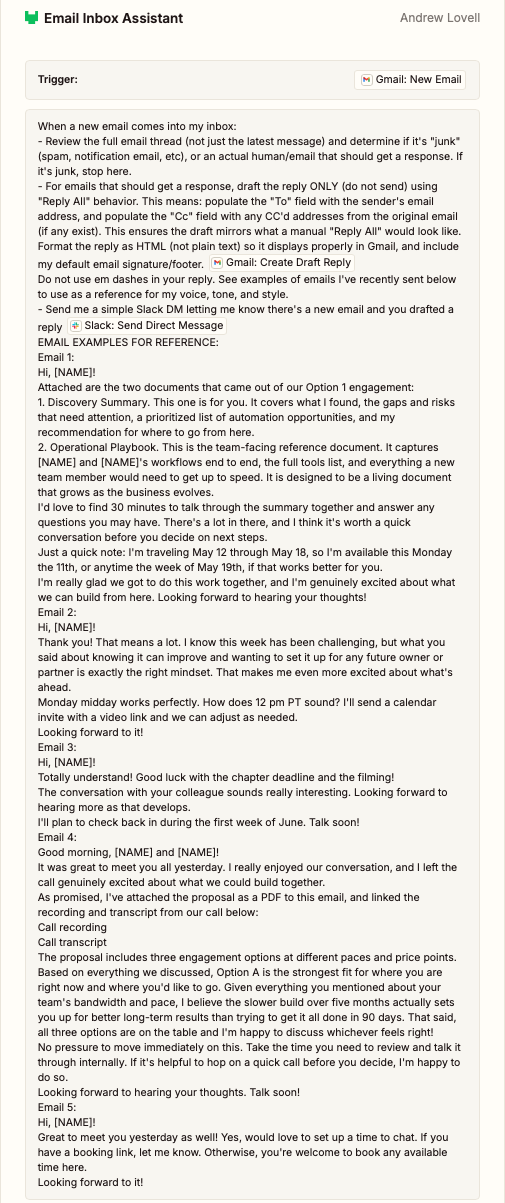
I have a Zapier AI agent that reads every email that comes into my business inbox. The first thing it does is decide: is this a real email that needs a human response, or is it noise (things like a confirmation, a newsletter, or a one-way notification)? If it's noise, it filters it out. If it's a real email from a real person, it drafts a reply.
It has samples of how I write. It has the full context of the thread. And when it's done, it sends me a Slack message saying: "Hey, you got an email from so-and-so about this, I drafted your response, go take a look."
I still review every reply before it goes out. I edit and adjust as needed. But that initial lift, going from the blank reply box to a first draft of the reply, is already handled. I've gone from doing a hundred percent of the work to doing the final ten percent. That compounds fast. The more emails you receive and send, the more value you get from a setup like this. The screenshot below shows my exact agent instructions from Zapier.
Some emails get both a drafted reply and a tag that fires a task to Airtable. Say a potential client emails me and says, "This sounds great, can you follow up in a few weeks?" My agent drafts the reply. I send it. I also tag the email, so Zapier fires a task to Airtable with a follow-up reminder. Nothing falls through the cracks, and nothing lives in my inbox longer than it needs to.
The bigger takeaway
A lot of software markets itself as an all-in-one solution, and while that sounds appealing, it's rarely true. Most tools are genuinely great at one specific thing. Email is great at sending and receiving messages. Airtable is great at organizing and tracking data. Zapier is great at connecting systems and automating handoffs.
When you use each tool for what it's actually built for, something shifts. Things get simpler. You stop fighting your inbox and start trusting your system. You get clarity.
Email is a messaging platform, whether you're using Gmail, Outlook, Superhuman, or any other email client, so stop asking it to be anything else.
Before we wrap
What's something that currently lives in your inbox that probably shouldn't? A to-do you keep flagging, a follow-up you keep putting off? Drop it in the comments. I'd love to hear what you're dealing with.
See you next week!
— Andrew