Stop Paying for Tools Nobody Uses
A few years back, I was responsible for managing software at a fast-growing company. We'd tried out a time tracking tool, decided it wasn't for us, and figured we'd just cancel before the renewal came around.
What I didn't know, because I wasn't tracking it properly anywhere, was that the contract had a clause buried in the fine print: if you wanted to cancel, you had to notify them sixty days before the renewal date. Otherwise, you were locked in for another year.
We missed the window and the renewal had already processed. What followed was a major headache of negotiating a buyout with a vendor we didn't even want anymore. It cost us time, money, and patience.
I'll never forget that experience, and it's exactly why I built a system to make sure it never happens again.
The problem with most tech stacks
There are a lot of great tools out there. And especially for small teams moving fast, it's easy to say yes to something new. Twenty bucks a month? Let's try it! Forty bucks a month? Seems worth it! Sometimes those tools are great. Sometimes they catch on and become indispensable.
But sometimes they just quietly keep charging you while nobody's actually using them anymore.
This is how you end up with three different scheduling tools, or two overlapping project management systems, or a handful of AI subscriptions that made sense in February and haven't been opened since. The stack bloats gradually, and because nobody has a full picture of what's actually in it, nobody notices until they're staring at a credit card statement wondering what half the charges are.
The audit: start with a list
Before you can make any decisions about your tech stack, you need to know what's actually in it. Not what you think is in it; what's actually being paid for right now.
If you have a clean system already tracking this, great. But if you don't, start with your bank or credit card statements. Go line by line. You'll probably find a few surprises.
Once you have the full list, run each tool through three questions:
What does this tool actually do and what value does it give us?
What are we paying for it, and how often?
Is anyone actively using it?
If a tool scores well on the first two but nobody's touched it in months, that's usually your answer. Once you can see the full stack in one place, you can also spot the overlap; the places where two tools are doing the same job and only one needs to stay.
What a system actually looks like
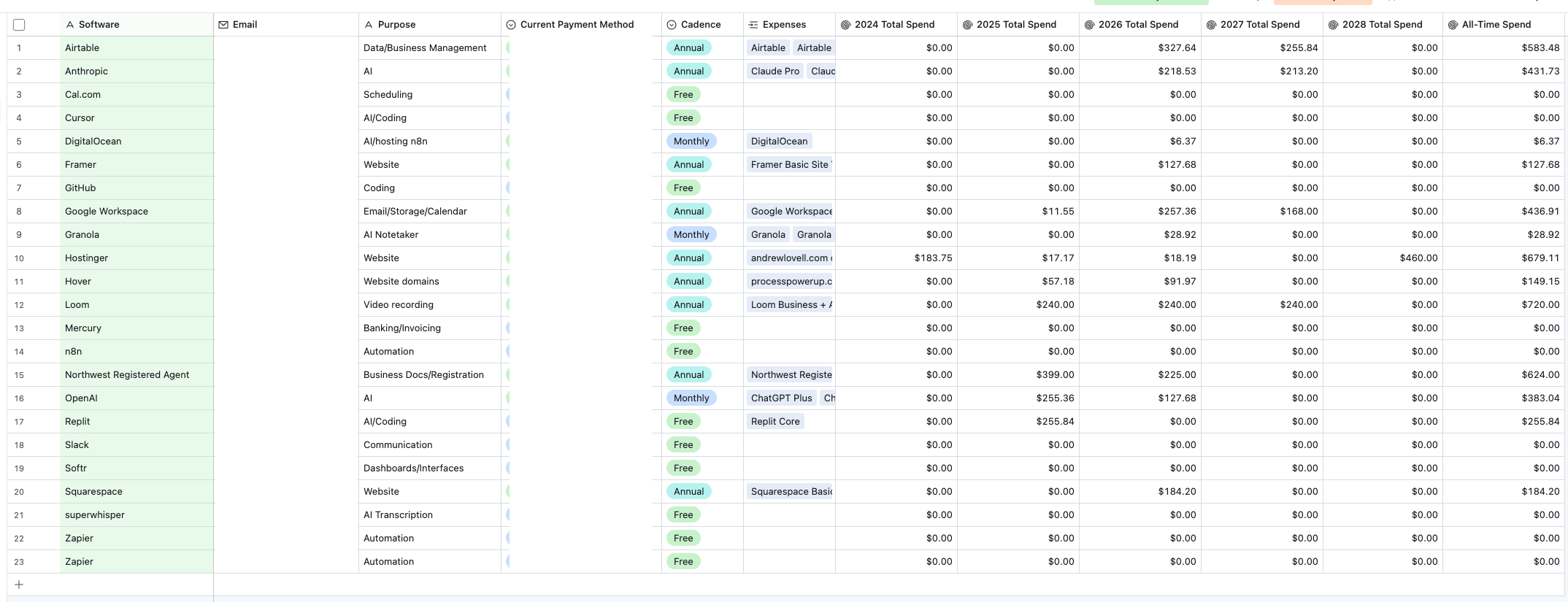
I track all of my software in a dedicated Airtable table. For each tool, I log the software name, what it's for, which email and payment method it's tied to, and whether it renews annually or monthly. I also link each tool to my expenses table, which lets me roll up exactly what I've spent on it by year, so I can see the all-time total at a glance. You can also track your upcoming renewal dates.
It's not complicated, but that's the point. It means I always know what I'm paying, when renewals are coming, and whether each tool is still earning its place.
The screenshot below is my actual Airtable setup. I've hidden my email addresses and payment methods, but otherwise this is exactly what it looks like.
Once you have a table like this, the automation almost writes itself.
A simple Zapier automation can check your software records and send you a Slack message or email whenever a renewal is thirty, sixty, or ninety days out, enough runway to actually make a decision instead of getting surprised. If you're paying monthly for a lot of tools, you might not need that level of detail. In that case, a single monthly reminder on the first of the month to do a quick audit works just as well.
I currently track twenty-three tools in my stack. Having a system means I know exactly what each one costs, when it renews, and whether it's still doing its job. Nothing slips through.
Keeping it clean going forward
Doing the audit once is step one. Keeping it clean is the part most people skip.
The key is making sure any new tool that comes in gets added to the system before it gets used. That means creating a protocol, even a simple one:
Maybe it's a new protocol that any new software purchase gets logged in Airtable before the card gets charged.
Maybe it's a form you and your team fill out that gets stored in Airtable or another accessible database.
Maybe it's just a standing agenda item for review in your team's weekly sync.
Whatever it is, it just needs to exist.
You don't need a perfect system. You just need something that prevents the stack from quietly drifting back into chaos six months after the audit.
A quarterly or bi-annual review is usually enough for most small teams. Set a recurring reminder, block an hour, and go through the list. Confirm what's still being used, what's not, and what's coming up for renewal.
It's not the most glamorous work, but it's the kind of thing that saves you from living the headache of the story I told at the start of this newsletter.
Before We Wrap
Do you know what you're spending on software every month? Not a ballpark; the actual amount. If the answer is no, that's your sign.
If you want help building something like this for your business, that's exactly what I do. Book a free discovery call anytime over at processpowerup.co/schedule-a-call.
See you next week!
— Andrew